

User-friendly rostering and time tracking, but with significant shortcomings
Verdict: 6.7/10
Droppah is an easy-to-use rostering and time tracking platform built for restaurants, retail shops, and hospitality businesses. I like how straightforward Droppah makes it to create basic rosters and track employees’ hours. I also like that it’s low-cost and offers a free plan for businesses with up to 10 employees.
However, I found that Droppah has various shortcomings. The platform offers limited flexibility for organising your employees across multiple locations or departments. You can’t require specific qualifications for shifts or add notes or photos to shifts. In addition, there’s no mobile app for managers and no analytics dashboard.
Overall, I think Droppah can work well for small businesses that want a free or inexpensive rostering tool and don’t have many employees to manage. But for larger businesses with more complex rostering needs, better alternatives are available.
Key Features:
- Rostering: Automatically create daily and weekly rosters and fine-tune them with a drag-and-drop editor.
- Time tracking: Track employees’ hours with a photo time clock that eliminates buddy punching and time theft.
- Employee app: Enable employees to check their schedules, swap shifts, and set their availability on the go.
- Integrations: Import revenue data from your point-of-sale system or run payroll with Xero and PayHero.
Pros
- Transparent, low-cost pricing
- Extremely user-friendly interface
- Multiple ways to create rosters
- Supports multiple pay rates and overtime rules
- Customer support by email, live chat, and video call
Cons
- No mobile app for managers
- Can’t add qualification requirements to shifts
- Doesn’t consistently enforce maximum shift limits
- No reporting dashboard or data export
Droppah Pricing
Droppah offers 2 pricing tiers:
| Plan | Time Clock | The Works |
|---|---|---|
| Key Features |
| Everything in the Time Clock plan, plus:
|
| Pricing |
|
|
I like how transparent Droppah is with its pricing, and the simplicity of the pricing tiers also felt refreshing. There are only 2 plans to choose from and no add-ons to navigate.
Droppah’s pricing is especially attractive for small businesses since The Works plan is free if you have 10 or fewer employees. This is a great offer for small businesses and startups without big software budgets.
That said, Droppah isn’t the only rostering and time tracking software with a free plan. Connecteam also provides free access to its entire operations, communications, and HR platform to small businesses with up to 10 employees.
For larger businesses, Droppah is still relatively inexpensive. For comparison, Deputy starts at $6.75 AUD/user/month for rostering and time tracking features. RosterElf starts at $7 AUD/user/month. Connecteam is slightly more cost-effective than Droppah, with paid plans starting at ~$45 AUD/month for 30 users. That comes out to $1.50 AUD/user/month, and each additional user is only $1.23 AUD/month.
| Team Size | Droppah (The Works) | Deputy | RosterElf | Connecteam (Basic) |
|---|---|---|---|---|
| View pricing | View pricing | View pricing | View pricing | |
| 10 Users | Free | $67.50/month | $70/month | Free for life — All features and dashboards |
| 20 Users | $80/month | $135/month | $140/month | $45/month |
| 30 Users | $120/month | $202.50/month | $210/month | $45/month |
| 50 Users | $200/month | $337.50/month | $350/month | $69.60/month |
| Learn more about Connecteam. | ||||
| * All prices are in AUD and show the monthly cost when billed annually as of November 2025. Connecteam’s pricing has been converted from USD to AUD. | ||||
Verdict: 8/10
Droppah Usability and Interface
I tested out Droppah using the live demo available on the company’s website. This is an excellent demo that provides full access to Droppah’s platform, including the ability to add employees and create schedules from scratch. I also read the platform’s support documentation. I looked for customer reviews, but couldn’t find any on major software review sites like Capterra, Slashdot, and SourceForge. Droppah’s app has just 1 review in the Apple App Store and none on Google Play.
Based on my experience, Droppah is very easy to use and doesn’t require much technical expertise. The interface is modern and uncluttered. When you want to add a new shift to a roster or make changes to a timesheet, all the available options appear in a pop-up. I think this simplifies the overall navigation and means you’re never more than a couple clicks away from all Droppah’s features.
A left-hand navigation menu lets you quickly move between the rostering, time clock, and analytics features. Company-specific settings that you’ll likely only need when setting up the software (like what day you want the week to start on) are contained on a dedicated page. I liked how easy it is to set up different overtime rules and pay rates for things like weekends, holidays, and night shifts. It’s also simple to add team members and set key parameters like their availability and pay rate with a few clicks.
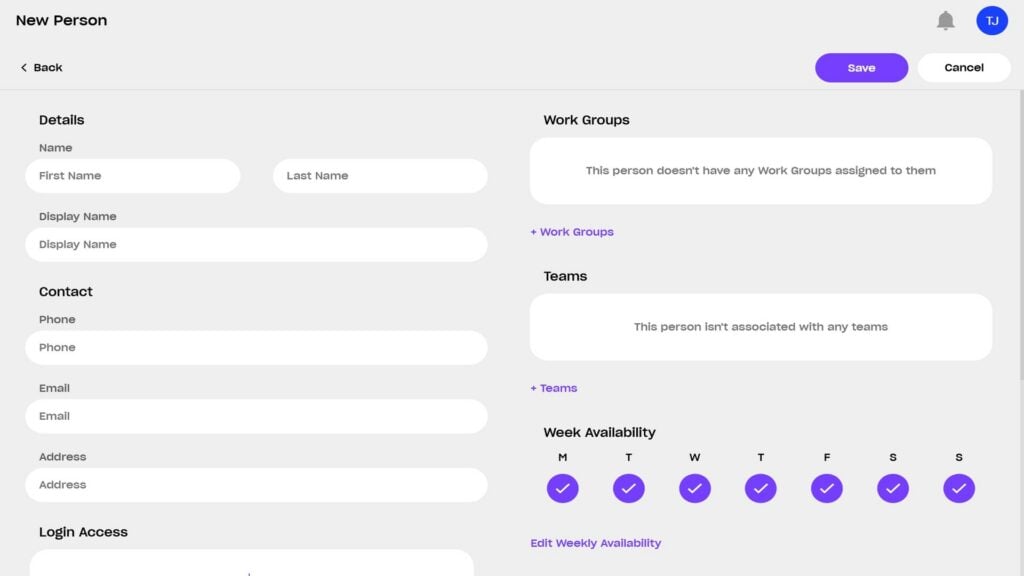
For rostering, there are 2 main ways to approach your schedule. First, you can view a weekly (or daily) calendar and add shifts, then assign employees to those shifts. Second, you can view a table that shows all your team members and their availability, then add shifts to each employee’s schedule. Both dashboards offer drag-and-drop functionality, so moving shifts around is easy.
That said, I think Droppah could do better with its alerts, particularly around overly long shifts and overtime. Droppah adds a small exclamation point to a shift when it involves overtime, but it’s easy to miss, and there’s no pop-up alert when you publish a schedule. Droppah uses the same inconspicuous alert for flagging shifts that are longer than your specified maximum shift length. I also ran into a few cases where the software failed to flag overly long shifts.
For employees with disabilities, Droppah is screen-reader compatible and colour-blind-friendly. However, there’s no way to navigate the platform using a keyboard only.
Verdict: 7/10
Mobile app
Droppah offers an employee mobile app for iOS and Android. It lets employees see their schedules, request shift swaps and days off, and view their timesheets.
I found the app to be pretty straightforward. I appreciated that it offers push notifications, so employees know right away when a new roster is published or a shift is changed.
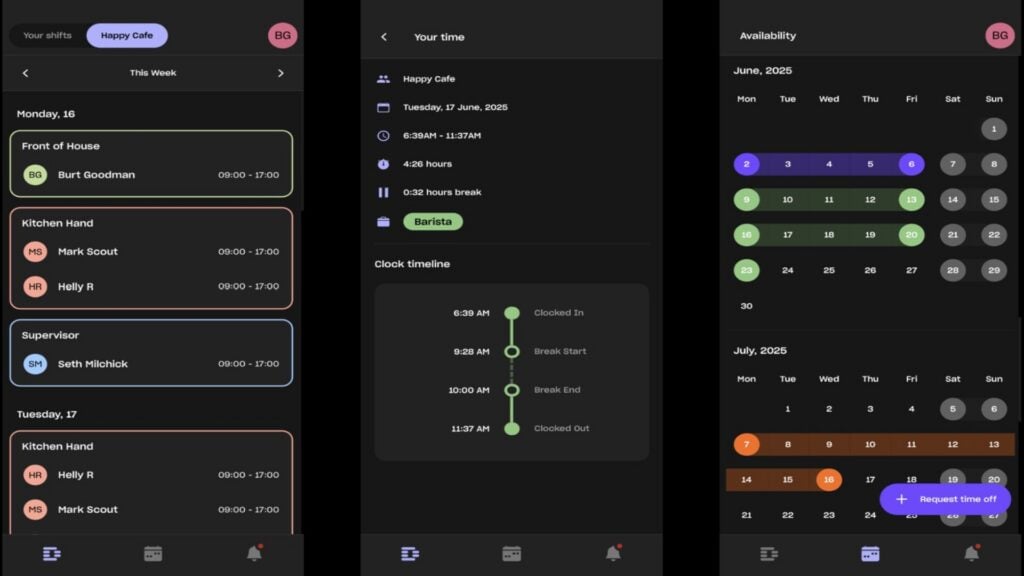
However, I’d like to see more functionality in the Droppah app. For example, it’d be nice to have clock in/clock out reminders so employees’ working hours are recorded accurately. I also wish the mobile app provided a way for employees to approve or edit their timesheets instead of making them view-only.
In addition, I’d like to see Droppah add a mobile app for managers so you can create rosters on the go. Other rostering apps, like Connecteam, offer much more mobile functionality for business owners.
Here’s how the mobile app compares with the Droppah web platform:
| Feature | Admin | Employee | |
| Website | Mobile App | ||
| Rostering | ✅ | ❌ | |
| View schedules | ✅ | ✅ | |
| Shift swapping | ✅ | ✅ | |
| Time clock | ✅ | ❌ | |
| Timesheets | ✅ | ✅(view only) | |
| Point-of-sale and payroll integrations | ✅ | ❌ | |
Verdict: 6/10
Droppah Core Functionalities
Droppah rostering
Droppah enables you to create rosters on a daily or weekly basis using a few different methods.
You can build them manually by creating shifts and adding employees to them. Alternatively, you can set up roster plans, which work like reusable templates. You can load any plan when creating a new week’s roster and then edit it as needed. Droppah’s rostering tool is drag-and-drop, so making changes is easy.
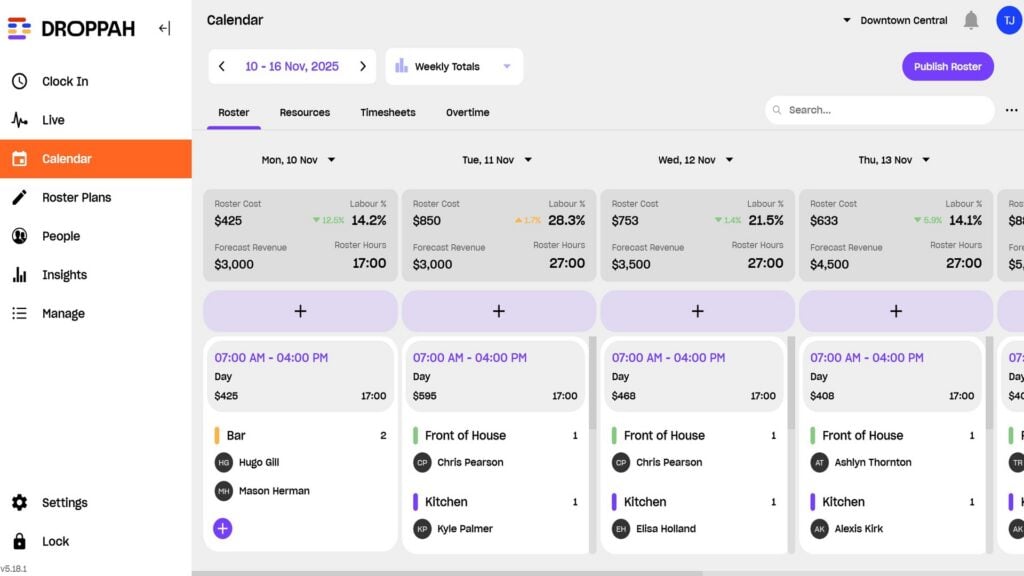
I like that Droppah also supports auto-rostering, which automatically creates weekly rosters for you following your chosen plans. It accounts for employees’ availability, shift limits, and labour costs.
You can also copy a roster from any week in the past to an upcoming week and edit it manually.
I was happy to see that Droppah lets you organise employees into teams and work groups. This is helpful for organising rosters across multiple locations or for different types of work. For example, for a restaurant, you can use teams to specify which employees work at which location and work groups to designate a shift as being for the front of house, kitchen, or bar.
However, I’d like to see more flexibility here. You can’t create sub-teams for a specific business location, for example, and Droppah doesn’t offer a way to add notes or photos to a shift to provide employees with more details about what they should be doing.
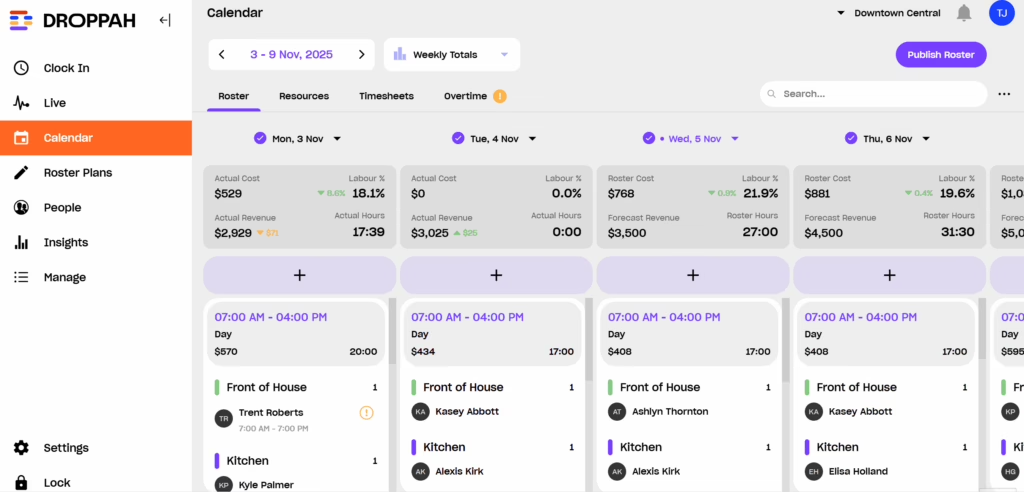
I was also disappointed that Droppah doesn’t give you much control over which employees can be assigned to which shifts. While you can assign employees to work groups, you can’t add certifications, qualifications, or specific roles to employees’ profiles. So, there’s no way to require shifts to include employees in certain roles or limit shifts to only employees with specific certifications.
This becomes a problem when, for instance, you have a shift that requires a specific team. Say you have a kitchen shift at a restaurant and you need 1 chef, 1 kitchen hand, and 1 dishwasher. You could create a Kitchen work group in Droppah that includes chefs, kitchen hands, and dishwashers, but there’s nothing to prevent you from assigning 3 dishwashers and no chefs or kitchen hands to the shift. Because of this, you can easily make mistakes when creating a schedule.
On a bright note, there are shift swaps. Employees can easily request coverage for a shift using the Droppah mobile app, and you can decide whether to require manager approval. It’s pretty basic but works well.
However, there’s no way to post open shifts that any employee can pick up.
Overall, I felt like Droppah’s rostering features were easy to use, but they offered very limited flexibility. They can work well for a company that has only a handful of employees and fairly repetitive rosters. But if your company has lots of different jobs or shifts with varying requirements, Droppah can let key details slip through the cracks.
Verdict: 5/10
Overtime and compliance
Droppah offers a few tools for managing overtime and meeting compliance requirements.
First, you can create multiple sets of overtime rules that apply to different situations or employees. I like this because it provides quite a bit of flexibility to offer different overtime rates for weekends, holidays, and night shifts.
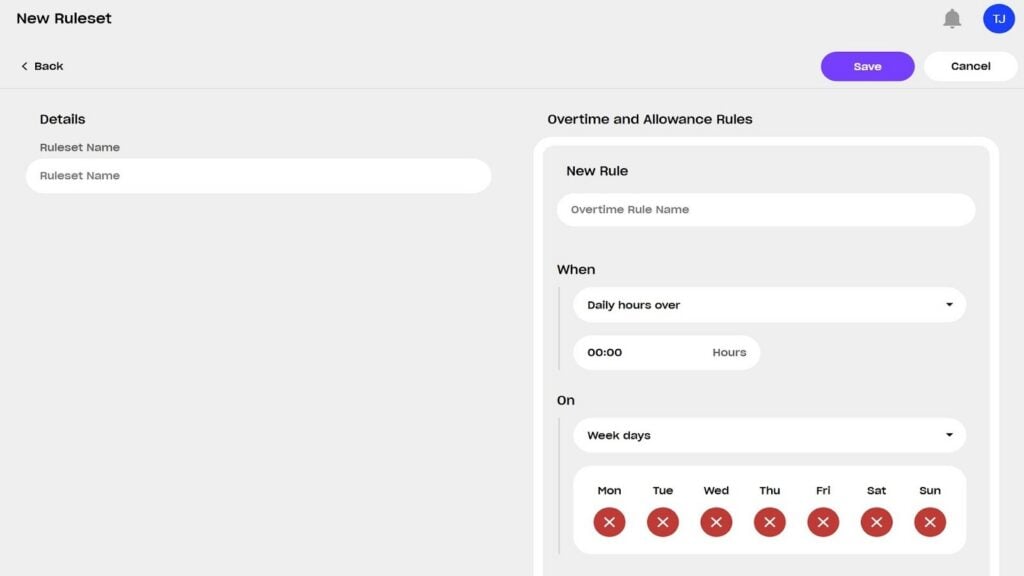
In addition, I liked that you can specify a maximum shift length and add required breaks to each shift. However, I found that Droppah doesn’t always enforce maximum shift limits when creating rosters. That can be a big problem for compliance with modern awards. Droppah also doesn’t remind employees to take their required breaks, which can also lead to non-compliance.
I was disappointed to find that Droppah doesn’t offer any leave management features. There’s no way to track how many days employees have taken off or to offer paid leave for vacation and sick time. This can be a big problem since Australia’s modern awards require paid leave for full-time and part-time employees.
Verdict: 4/10
Droppah time tracking
Droppah uses a photo time clock that requires employees to take a selfie from a centralised time kiosk—like an iPad logged into your Droppah account—to clock in and out of shifts. You can easily review the selfies in a clock history dashboard that lists all your clock-ins and clock-outs, which is an effective way to prevent buddy punching and time theft. Employees can use the same time kiosk to clock in and out of breaks.
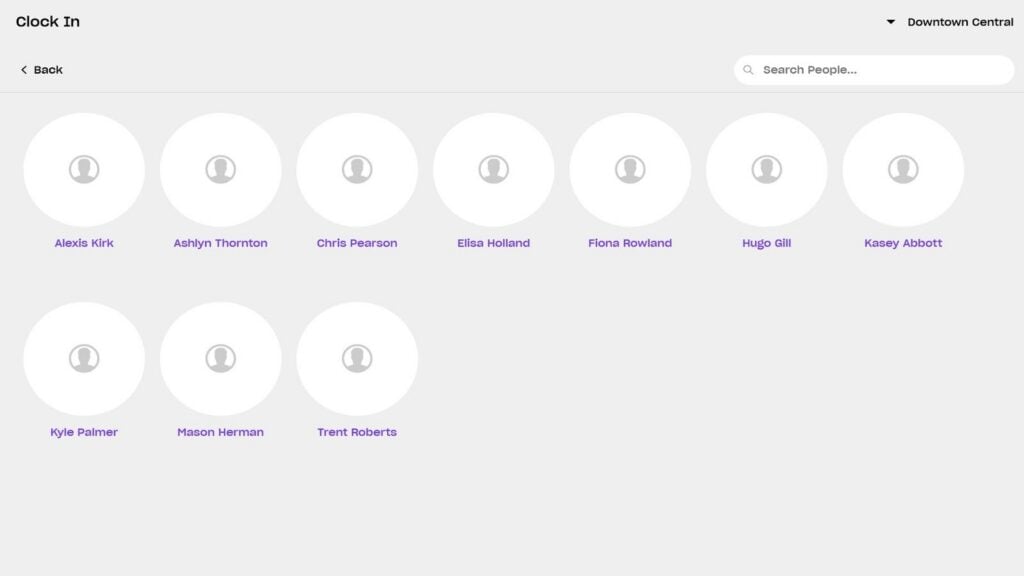
However, this system works only for employees who work at a centralised location, like a restaurant or shop. Droppah doesn’t offer a way for employees to clock in or out using the mobile app, so it’s impractical to use this time clock for distributed or field-based employees.
You can view employees’ hours in real-time on the Droppah dashboard and see who’s clocked in right now. However, there are no alerts for no-shows or late arrivals, which feels like a big miss.
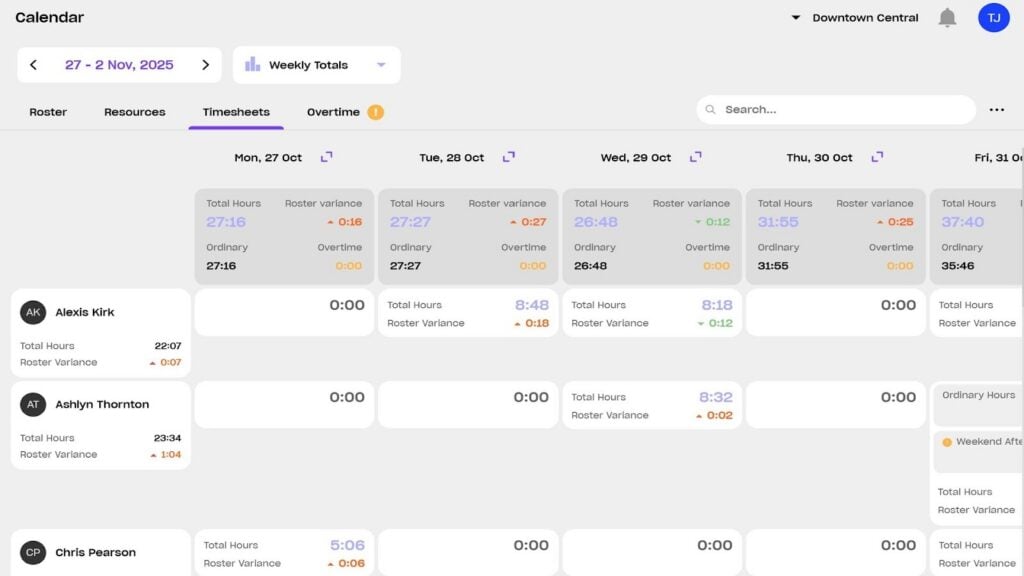
Droppah automatically generates timesheets for each employee, which you can edit (employees can’t). When approving timesheets, Droppah highlights differences between your team’s rostered and actual hours. You can integrate Droppah with Xero or PayHero to run payroll in a few clicks or export your approved timesheets in CSV format.
Verdict: 7/10
Droppah Security
Droppah helps you secure your data by offering 4 user roles: owner, admin, manager, and employee. Admins can access all features of Droppah except billing details, while managers can access all features related to the specific teams they’re in charge of. While larger businesses might need more customisable roles, I think these 4 roles are sufficient for most small businesses.
When using Droppah as a time kiosk, you can set a custom PIN to lock the software to the clock-in page. This prevents employees from navigating to other features within Droppah when accessing the platform on your account.
In addition, Droppah supports two-factor authentication (2FA) using authenticator apps to help keep your account secure.
Droppah isn’t certified to any major cybersecurity standard, such as ISO 27001. However, I don’t think this is a huge deal since you don’t need to store any highly sensitive or protected data about your employees or your business on the platform.
Verdict: 7/10
Droppah Reporting and Analytics
Droppah currently doesn’t have a reporting dashboard. There’s an “Insights” menu item in the web platform that promises an analytics interface is coming soon, but doesn’t provide an estimated launch date.
For now, the only reporting you get is within the rostering interface. There, you can see the total number of rostered hours for each day and the expected labour cost. Droppah integrates with point-of-sale systems, including Square, Clover, and Lightspeed, to import revenue forecasts for each day and calculate your labour cost as a percentage of your expected revenue. For shifts that have already taken place, you can see your rostered hours vs. timesheet hours, overtime hours, actual revenue, and actual labour costs.
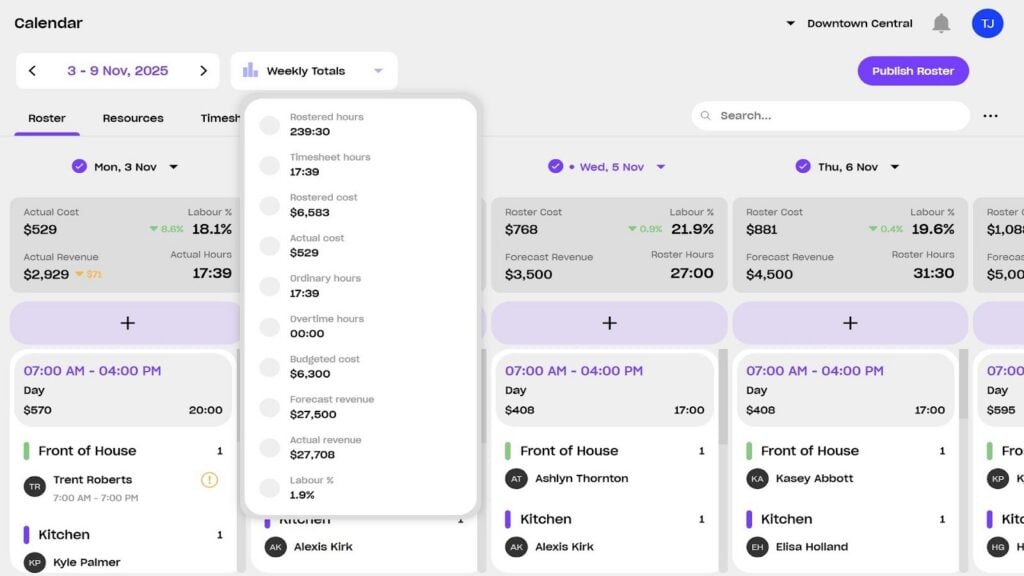
The problem is that since this data is aggregated on a daily or weekly basis in the rostering interface rather than in a dedicated reporting dashboard, it’s really difficult to track trends over time. Worse, there’s no way to export the data that Droppah collects. So, while I’m glad to see that Droppah is working on improving its analytics features, the current lack of a dedicated reporting interface is a major shortcoming.
Verdict: 3/10
Droppah Customer Support
Droppah offers customer support by live chat and email from 9:00 am to 5:00 pm (AET). In addition, customers on The Works plan can schedule a 15-minute video call with Droppah’s support team. I contacted the support team by live chat and was connected with an agent in about 2 minutes.
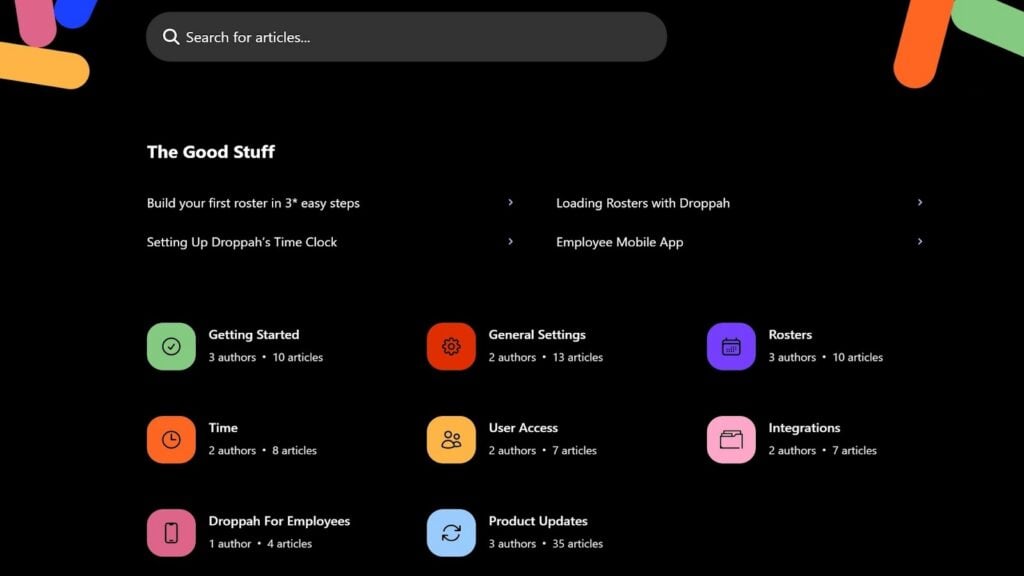
Droppah also has an online knowledge base with articles about how to create rosters, set up the time clock, and use the mobile app. I found the articles to be detailed and appreciated that they included several screenshots.
Verdict: 9/10
What Are Droppah’s Review Ratings from Review Sites?
(As of November 2025)
Apple App Store: 5/5
Droppah App Review
Droppah is a basic rostering and time tracking platform that can work well for small restaurants, retail shops, and hospitality businesses. It’s very easy to get started with, and I think managers will appreciate the drag-and-drop functionality, auto-rostering, and point-of-sale integrations.
However, Droppah has much room for improvement. For example, I’d like to see it do a better job with alerts and reminders to help your business reduce overtime and ensure compliance with labour requirements. I’d also like to have the ability to add notes, photos, and required qualifications to shifts. Most of all, I want Droppah to introduce a mobile app for managers and roll out its promised analytics dashboard.
Overall, Droppah can work well for small businesses that only have 1 or 2 locations and 10-20 employees to keep track of. For larger businesses, I think Droppah lacks the advanced features needed to manage complex and compliant rosters and ensure accurate time tracking.
Connecteam: The Better Droppah Alternative
Connecteam is an all-in-one business management platform that includes much more robust rostering and time tracking tools compared to Droppah. It works across industries and is well-suited to restaurants and hospitality businesses.
I’m a big fan of Connecteam’s drag-and-drop employee scheduler, which enables you to auto-assign shifts with a click and then easily fine-tune your roster. Employees can set their availability and preferred hours, ensuring everyone gets the shifts they want. I also like that you can create open shifts that any employee can pick up.
For hospitality and retail businesses with multiple locations, Connecteam enables you to create independent rosters for each location. You can also add qualification requirements to shifts to ensure you always have the right employees working. Custom break and overtime pay rules help you stay compliant and reduce labour costs, and I like that Connecteam provides clear alerts when an employee is scheduled for overtime.
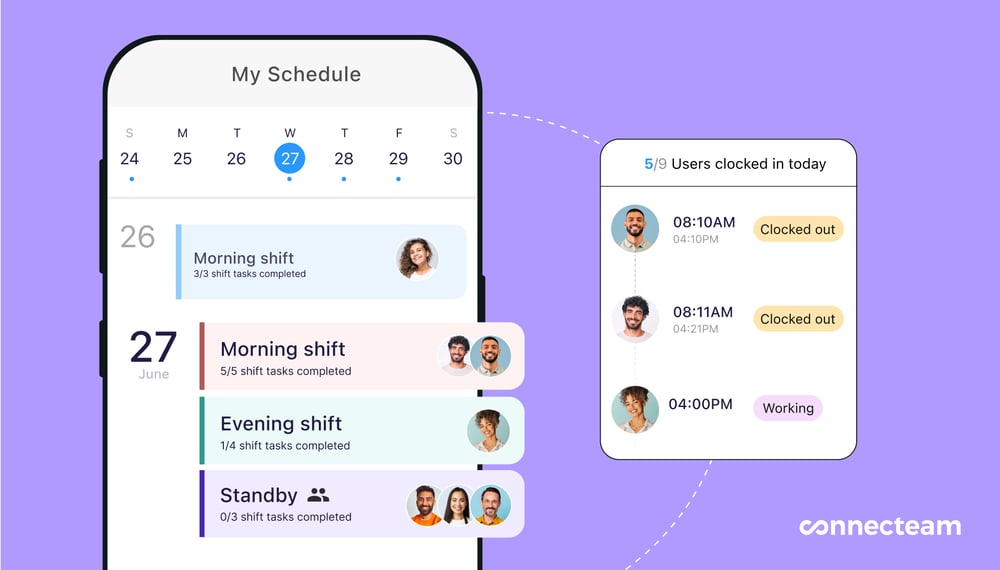
Connecteam also lets you attach notes, documents, tasks, and photos to shifts so employees know exactly what to do when they show up for work. If there’s an issue, employees can leave a note directly on the roster so employees on the next shift know what to expect.
I also love Connecteam’s employee time clock, which offers multiple ways for employees to clock in and out. You can set up a centralised time kiosk or enable employees to clock in and out with a tap on their smartphones. The time clock is GPS-enabled, so employees get a reminder to clock in when they show up to work and are automatically clocked out when they leave. It’s a great solution whether your employees work at a designated location (like a restaurant) or in the field.
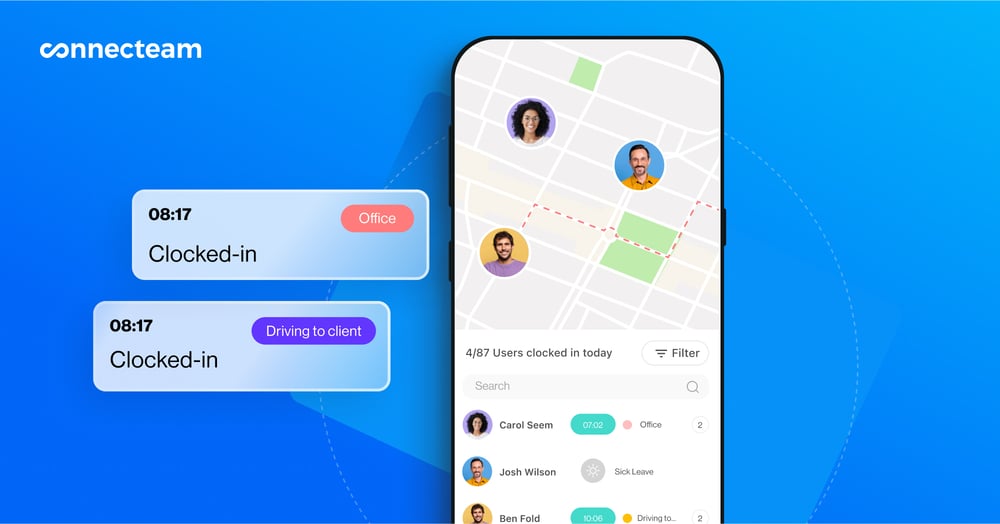
Another great thing about Connecteam is that it offers a mobile app for both managers and employees. Managers can create rosters, check who’s working, and approve timesheets on the go. You’ll also get real-time alerts when employees go into overtime without prior approval or fail to show up for work. Employees can view their schedules, review and approve their timesheets, and access job-specific forms and checklists on the Connecteam app.
Best of all, Connecteam is extremely affordable. It’s completely free for companies with up to 10 employees. Plans for larger businesses start at ~$45 AUD/month for 30 users plus ~$1.23 AUD/month for each additional user.
FAQs
Droppah doesn’t have a free trial, but you can try out the platform for yourself using a live demo. Droppah offers a free plan for businesses with up to 10 employees.
No, Droppah isn’t HIPAA compliant. This platform is designed for restaurants, retailers, and hospitality businesses, so the data it collects about employees isn’t typically subject to HIPAA. Droppah also mainly caters to businesses in Australia and New Zealand, where HIPAA regulations don’t apply.